
How to Hide Your Real Email When Registering Site Online
Tired of handing over your inbox to every new site? Using your main email for sign-ups often leads to spam, leaks, and phishing. The fix is simple. Use an email alias, a burner address, or a mask that keeps your real inbox private. An alias is an alternative address that redirects to you. A burner is a short-lived address for one-time use. To mask your email means to hide your real address during registration.
Quick safety note: always use your real email for banks, government, school, healthcare, or anything tied to money or identity.
In this guide, you will learn about the best tools, clear step-by-step processes, and smart recovery tips, enabling you to register safely without losing access. The steps are simple, phone or laptop-friendly, and fast.
Why hide your real email for new site sign-ups
 Photo by NEOSiAM 2024+
Using your main inbox everywhere creates a single point of failure. If a store or forum leaks your address, spam and phishing follow. Data brokers link your email to purchases and habits. Tracking pixels can confirm you opened a message. Some links fingerprint your device. Changing your primary email is hard, so the junk piles up.
Email masking flips the script. You create one unique address per site, such as shop@youralias. That alias forwards mail to your real inbox. If spam starts, you switch it off or delete it and keep your main address clean. Replies route through the alias service, so you can answer without revealing your real address.
This approach keeps conversations functional while giving you control. It also helps you trace who leaked your address. If shop@youralias gets spam, you know which store is the source, then block only that alias.
There are limits. Do not hide your email for banking, taxes, healthcare, schools, or work HR. These services need a stable, verified email and long-term access. Some sites require a real address for age checks or KYC, so follow the rules and your local laws.
Plan account recovery before you start. If you disable an alias, make sure you can still reset your password or update the email on that site first.
The risks of using your main inbox everywhere
- Spam and promo overload after one leak.
- Phishing that looks like real notices.
- Data brokers link your email to your habits.
- Breaches where lists of emails get sold.
- Targeted ads and tracking pixels inside emails.
- Hard to fix, since you cannot change your main email easily.
Related Post: How to Block Junk Emails: Ultimate Guide for Gmail, iPhone & Top Tools
How email masking and aliases protect you
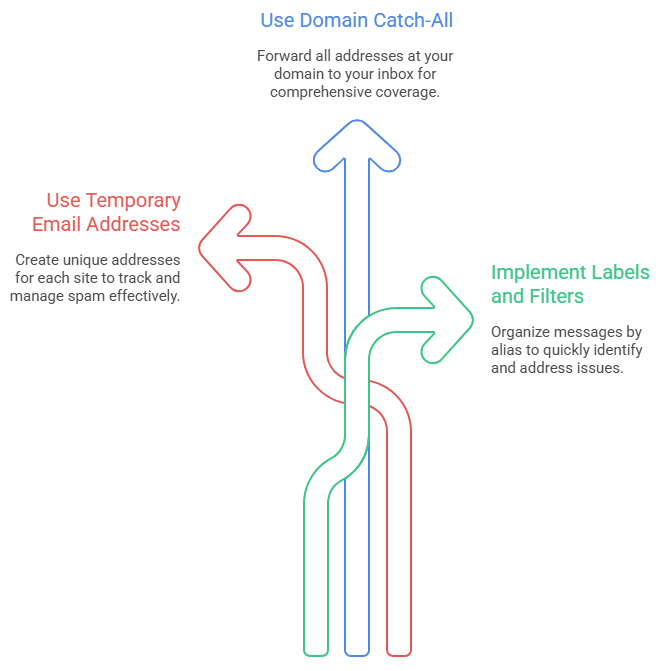
An alias is a different address that forwards to your inbox. Create one temp mail per site to keep things clean and traceable. If a site leaks or spams, you turn off only that address. Replies route back through the service, which keeps your real email private. If you own a domain, a catch-all lets any address at that domain forward to you. Bonus points for labels and filters, so you sort messages by alias and spot problems fast.
Rules to follow so you do not lock yourself out
- Use your real email for any money, legal, or medical account.
- Keep a simple note that maps the site to the alias.
- Add a recovery email or phone number you control.
- Turn on 2FA with an authenticator app if possible, not just SMS.
- Do not share burner emails with others, since some services reuse addresses.
- If a site blocks temporary emails, use an alias service or your own domain.
Best ways to hide your email during registration
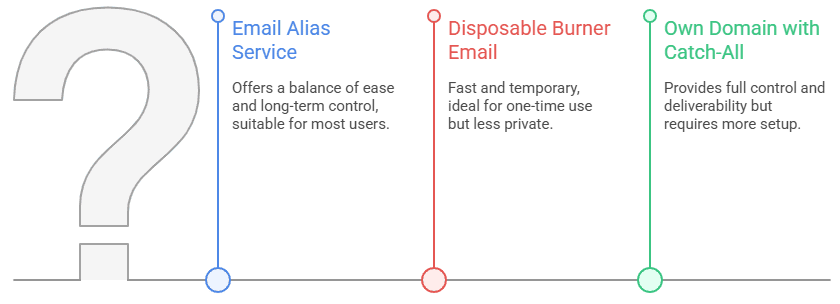
There are four smart paths. Email alias services are easy and reliable. Disposable burner emails are fast and temporary. Your own domain with a catch-all gives you full control. Forwarders and filters help you stay organized inside one inbox.
For most people, an alias service is the best mix of ease and long-term control. Services include iCloud Hide My Email, Firefox Relay, SimpleLogin by Proton, Proton Pass aliases, DuckDuckGo Email Protection, Fastmail Masked Email, and AnonAddy. For a quick overview of how aliases protect your identity, see Proton’s guide to hide-my-email aliases.
If you only need an address for a one-time download or trial, disposable inboxes like TempMail, Guerrilla Mail, Maildrop, or 10MinuteMail can work. Just know that many are public and short-lived, and some websites block them.
Power users can buy a short domain and use a catch-all so any address at that domain forwards to them. Providers like Fastmail, Proton with SimpleLogin, or routing tools can make this simple. SPF, DKIM, and DMARC help with deliverability.
Key factors to weigh: ease, cost, privacy, reliability, deliverability, and whether you can reply without exposing your real email. A quick chooser: quick and easy, pick an alias service; one-time throwaway, choose a burner; total control, use your own domain.
Key factors to consider: ease, cost, privacy, reliability, deliverability, and whether you can reply without revealing your real email. A quick summary: for quick and easy, choose an alias service; for a one-time throwaway, pick a burner; for total control, use your own domain.
Related Post: Use Temp Mail Ninja PW to protect your primary mailbox from spam
Email alias services: simple and reliable
- iCloud Hide My Email needs iCloud+, and it works on iPhone, iPad, Mac, and Safari.
- Firefox Relay has free and paid plans, with custom domains on paid.
- SimpleLogin by Proton and Proton Pass aliases focus on privacy and support replies.
- DuckDuckGo Email Protection gives you an @duck.com address and strips trackers.
- Fastmail Masked Email integrates with 1Password and Bitwarden.
Pros: easy to create unique aliases per site, solid deliverability, and reply support.
Cons: some cost, and you depend on a service.
Best for: daily sign-ups where you want long-term control. For a broader primer on aliases, StartMail’s guide on using email aliases to protect your privacy is helpful.
Disposable burner emails: quick and temporary
Services like TempMail, Guerrilla Mail, Maildrop, and 10MinuteMail work well for short tasks. Use them for one-time downloads or trials when you do not need access later. Keep the tab open until you click the verify link.
Be careful. Many burner addresses are public or shared, so never use them for private or financial accounts. Some sites block these domains, and deliverability can be spotty. Inboxes expire quickly, which means you could lose password resets. Best for short-lived sign-ups where you do not care about future access. Curious how others approach burners? See this community discussion on burner emails for privacy.
Use your own domain with catch-all aliases
Buy a short domain you like, for example, yourlastname.email. Set up email hosting or a forwarder with a catch-all, so any address at that domain routes to you. Create a new alias per site, like shop@, forum@, or travel@.
Pros: full control, strong deliverability, easy to block one alias, and a professional look.
Cons: small yearly cost, plus some setup.
Note: SPF, DKIM, and DMARC help keep your mail out of spam. Most providers walk you through these settings. Best for people who want a long-term, private system.
Related Post: Top 10 Use Cases for Temp Mail Ninja PW
Forwarders and filters that keep control
Forwarders like ImprovMX or Cloudflare Email Routing send mail to your real inbox. Providers like Proton Mail and Fastmail let you create aliases and add strong filters. Gmail plus addressing helps with sorting, such as [email protected], but it does not hide your base address.
Use filters to auto-label, archive, or mute noisy senders. If spam starts, disable or delete the alias, not your main email. Best for people who want low effort control inside one inbox.
Step-by-step: sign up without your real email, safely
Fast method with an alias service (2 minutes)
- Pick a tool: iCloud Hide My Email, Firefox Relay, SimpleLogin, or Proton Pass aliases.
- Create a new alias when the site asks for an email.
- Copy the alias into the sign-up form.
- Check your inbox for the verification code or link and confirm.
- Add a label or note with the site name.
- If spam starts later, disable that alias.
Tip: install the browser add-on or mobile app so creating aliases is one tap.
Stronger method with your own domain (10 minutes)
- Buy a domain you like.
- Choose hosting or a forwarder with a catch-all, such as Fastmail, Proton via SimpleLogin, ImprovMX, or Cloudflare Email Routing.
- Follow the setup guide to add MX records.
- Turn on SPF, DKIM, and DMARC using the provider wizard.
- Create a unique alias for the site, like sitename@yourdomain.
- Sign up, then test a reply. If spam shows up later, block only that alias.
Tip: keep a simple sheet that maps site names to aliases.
Burner method for one-time use
- Open a disposable email site.
- Copy the temporary address into the sign-up form.
- Keep the page open and wait for the verification email.
- Click the link, finish the task, then close the tab.
Caution: Do not use for accounts you may want later. Some sites block these domains. Inboxes may be public or shared. Tip: If a site blocks burner domains, switch to an alias service instead.
Keep access and security: recovery, 2FA, and notes
- Save logins in a password manager, and note the alias used.
- Add a recovery email or phone number you control.
- Turn on 2FA with an authenticator app or a hardware key.
- Store backup codes in your password manager.
- Use filters or labels for each alias to spot spam fast.
- If an alias gets noisy, disable it, not the account. Update the email on the site first if you still need access.
Wrap-up: hide your email smartly without losing access
Here is the simple plan. Use alias services for most sign-ups, choose burners for short one-off forms, and pick your own domain if you want full control. Set up one alias tool today and use a fresh alias on your next registration. Keep recovery options updated, turn on 2FA, and follow site rules and local laws.
A tidy inbox starts with one alias per site, simple notes, and quick blocking when needed. Want a quick win? Review your last 10 sign-ups and swap in aliases where it makes sense. Your privacy will thank you.
Share this page